





















Kahoot.com vs Kahoot.it: When you type the name of this popular educational platform into a search engine, you immediately encounter two completely different web addresses: Kahoot.com and Kahoot.it. This structural split causes significant confusion for first-time users. Students trying to play a live quiz often end up on a corporate page asking for a credit card, while teachers attempting to build a new lesson sometimes stare at a blank screen asking for a numeric PIN.
Understanding why the company utilizes two separate domains eliminates this frustration. The platform deliberately separates its user base to keep live games running smoothly without crashing the main servers. This guide explains the exact differences between the two websites, how they interact, and which specific link you need to use based on your role in the classroom or boardroom.
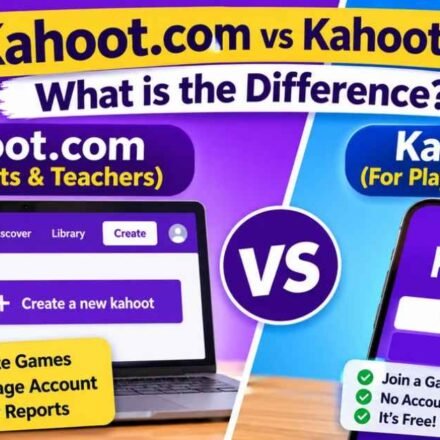
Quick Answer The difference between the two websites depends entirely on your role. Kahoot.com is the creator dashboard used by teachers, presenters, and hosts to build quizzes, manage accounts, and launch live games. Kahoot.it is the player screen used exclusively by students and participants to join a live game. Players never need to create an account or pay a fee; they simply navigate to Kahoot.it, enter the numeric Game PIN provided by the host, and start playing immediately.
The Short Answer: Creators vs. Players
Educational technology companies often separate their infrastructure to manage heavy web traffic. One side of the platform handles the heavy lifting of storing accounts, building quizzes, and processing payments. The other side handles the fast, lightweight action of live answering.
The easiest way to remember the difference is to associate the .com domain with the person managing the room, and the .it domain with the people sitting in the audience.
| Feature | Kahoot.com (The Host) | Kahoot.it (The Player) |
|---|---|---|
| Primary User | Teachers, Presenters, Admins | Students, Audience Members |
| Account Required? | Yes (Free or Paid) | No |
| Main Function | Create, edit, launch, and analyze games | Enter a PIN to answer questions |
| Interface Style | Detailed dashboard with navigation menus | Minimalist blank screen with a single text box |
| Cost to Use | Free basic tier, with premium paid options | Always 100% free for participants |
| Device Preference | Best managed on a desktop or laptop | Best experienced on a mobile phone or tablet |
What is Kahoot.com? (The Host and Creator Dashboard)
If you are the person in charge of running the game, you need to use the .com website. This domain serves as the administrative hub for the entire software ecosystem. When you navigate to this primary domain, you will see marketing materials, enterprise pricing plans, feature announcements, and login buttons.
Because creating a quiz requires saving data to a cloud server, you must have an active account to use this side of the platform. The platform offers several subscription tiers, which is why users frequently encounter paywalls when navigating this domain.
Once you log in to your host dashboard, the interface changes into a comprehensive content management system. You can build new interactive questions, search the public library for existing templates created by other educators, and review detailed grading analytics from your past sessions.
This domain is also the exact place where a teacher or presenter clicks the “Start” button to initiate a live session. Clicking that button generates the numeric Game PIN that everyone else in the room will need to connect to the session.
The Technical Requirements for Hosts
Because the creator dashboard involves complex actions like uploading high-resolution images, importing spreadsheet data, and organizing folders, it requires a stable internet connection and a larger screen.
While you can technically access the .com dashboard on a mobile web browser, navigating the quiz creator on a small touchscreen is incredibly frustrating. The company explicitly designed this side of the platform with desktop and laptop users in mind.
What is Kahoot.it? (The Player and Participant Controller)
If you are sitting in a classroom or a corporate audience waiting to play, you need to use the .it website. This domain acts exclusively as a participant controller.
The developers designed this specific web address to be as fast and lightweight as possible. School Wi-Fi networks frequently struggle with bandwidth when thirty students try to load a webpage simultaneously. By removing heavy graphics, account menus, and marketing videos, the .it domain loads almost instantly even on weak internet connections.
When you navigate to this site, you will see a nearly blank screen containing a single interactive box asking for a Game PIN. The interface is deliberately sparse to prevent distractions.
Privacy and Account-Free Access
One of the most important aspects of the player domain is its strict approach to user privacy. You do not need to create an account, enter an email address, or remember a password to participate.
The platform guarantees free player access to anyone holding a valid PIN. Because the system does not force students to hand over personal data, the platform easily complies with strict student privacy laws like COPPA (Children’s Online Privacy Protection Act) in the United States.
Once you type in the numerical code provided by the host, the website asks you to choose a nickname. After you submit your name, your smartphone, tablet, or Chromebook essentially turns into a digital answering pad for the duration of the game.
The Connection Point: How the Game PIN Works
The two websites operate independently but communicate in real time through the Game PIN. This unique sequence of numbers acts as a temporary digital bridge between the host’s server and the players’ devices.
When a host launches a game on the .com website, the software generates a secure, randomized PIN. When a student enters that exact PIN on the .it website, the system links the student’s device to the host’s specific session.
This real-time connection ensures that when the host clicks “Next” on their laptop, the answering buttons immediately appear on every student’s phone. Once the host ends the game and closes the session, that specific PIN expires permanently, and the bridge between the two websites collapses.
Troubleshooting: Did You Go to the Wrong Website?
Because the names are nearly identical, users frequently click the wrong link in Google search results. If you find yourself on the wrong website right as a classroom game is about to start, you can switch over easily without having to perform another web search.
If you are a student who accidentally went to the main .com domain, do not panic and do not try to sign up for an account. Look at the very top right corner of the website’s navigation bar. You will see a small text link or button that says “Play.”
Clicking that “Play” button immediately redirects your browser to the minimal .it PIN entry screen so you can join a live game before the timer runs out.
If you are a teacher who accidentally went to the .it domain, you cannot log into your dashboard from that blank screen. There are no hidden admin buttons on the player portal. You must physically highlight the .it in your browser’s top address bar, change it to .com, and hit enter to access the proper administrative login page.
Bypassing the “Sign Up” Loop
A common issue reported on community forums like Reddit involves users getting stuck in an endless loop asking for payment or registration. This happens exclusively when participants try to join a game through the .com domain.
Remember this strict rule: The official player portal will never ask a participant for a credit card, an email address, or a password. If you are trying to join a game and see a paywall or a signup sheet, you are on the wrong domain. Close the tab immediately and type the .it address directly into your URL bar.
School Network Firewall Issues
Occasionally, school IT departments complicate this domain separation. Because students only need the .it website to participate in class, strict school network firewalls sometimes whitelist the player domain while completely blocking the .com domain.
If you are a teacher trying to launch a game and the website refuses to load, your IT department may have accidentally blocked the creator dashboard. You will need to contact your network administrator and request that they unblock the primary domain so you can access your teaching materials.
Does the Mobile App Use Both Websites?
If you download the official mobile application from the Apple App Store or Google Play Store, you do not need to worry about typing either web address. The developers engineered the mobile app to combine both functions into a single, unified piece of software.
When you open the mobile app without logging in, you will see a large, prominent button at the bottom of the screen prompting you to “Enter PIN.” Tapping this button activates the participant controller, mirroring the exact functionality of the .it website.
However, if you tap the profile icon and log into your teacher or premium business account, the app unlocks the creator dashboard. From there, you can build quizzes, review analytics, and launch live sessions, mirroring the functionality of the .com website.
When to Use the Web Browser Instead
While the mobile app handles both roles seamlessly, most professional educators prefer using standard web browsers for administrative tasks. Building a forty-question quiz with customized images and specialized timer settings is tedious on a mobile touchscreen.
For the best experience, hosts should build and launch their games using a desktop computer navigated to the .com domain. Meanwhile, players enjoy the best experience using the mobile app or navigating to the .it domain on a smartphone, as touchscreens are ideal for quickly tapping multiple-choice colored buttons. This split-device strategy allows users to play Kahoot solo for review or participate in massive group events efficiently.
Frequently Asked Questions (FAQ)
Can I create an account on Kahoot.it to save my scores? No. The player domain does not support account creation or data storage. It is designed solely as a temporary gateway to enter a live game. If you want to track your learning progress over time, you must create an account on the main .com domain or use the official mobile app.
Why does Kahoot.it block the nickname I am trying to use? If the player portal rejects your chosen name, the host has likely enabled the “Friendly Nickname Generator.” This safety feature automatically prevents participants from typing custom names to maintain a professional or appropriate classroom environment. The system will assign you a random, safe name instead.
Do I need a fast Wi-Fi connection to use the player screen? Because the player domain is highly optimized and strips away heavy graphics, it requires very little bandwidth. Students can typically participate in a live game using a standard 3G or 4G cellular data connection if the school Wi-Fi is unreliable, provided the host has a strong connection to keep the main game running.
Can I host a game from the player website if I am a teacher? No. The .it website completely lacks the software infrastructure to host, build, or manage games. It acts strictly as a receiver for game data. To host a session, you must use the main .com website or log into a registered account on the mobile app.