

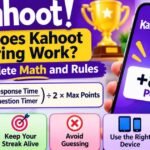
























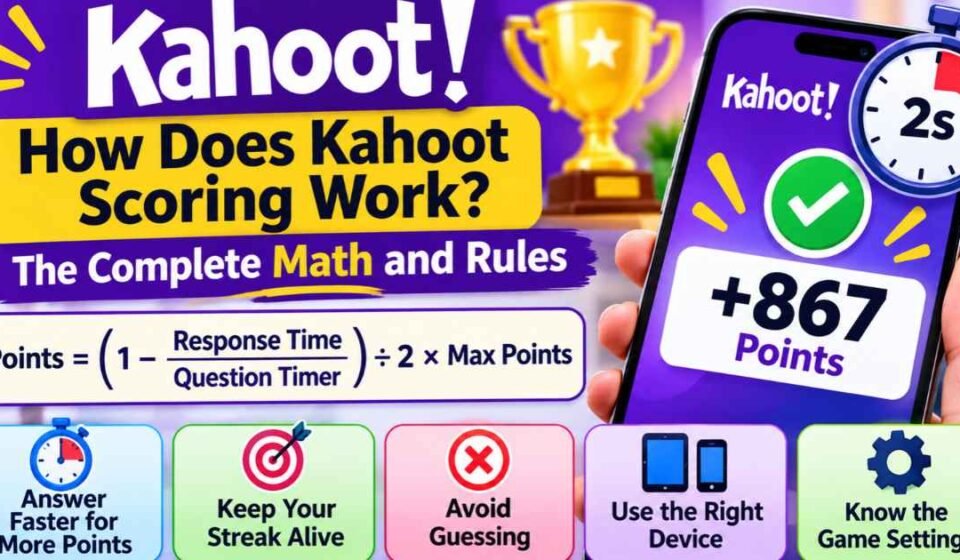

Many players stare at their screens after a trivia round wondering why they received exactly 867 points instead of a flat number. You might also wonder why a classmate ended up ahead of you on the final podium even though you both answered the exact same number of questions correctly.
Kahoot does not award points randomly. The platform relies on a specific mathematical formula that calculates your score down to the millisecond. This system is designed to prevent ties and reward players who can recall information instantly.
Understanding the mechanics behind this formula helps players compete more strategically. It also helps teachers configure their classroom games fairly, ensuring that the point system matches their educational goals.
Quick Answer: How Kahoot Scoring Works. Kahoot calculates points using a time-decay formula based on how fast you answer. A standard correct answer awards a maximum of 1,000 points. As the timer ticks down, the available points slowly decrease. However, a correct answer at the absolute last second will always award exactly half of the maximum points (500). Incorrect answers always award 0 points. Recent updates to the platform also changed answer streaks; streaks are now purely for visual motivation and no longer grant bonus points to your final score.
The Core Time-Decay Formula Explained
In a classic game, the faster you select the correct answer, the more points you earn. The system measures your physical response time in fractions of a second. This precision is why two players almost never receive the exact same score on a single round.
Official platform documentation reveals the exact math used to calculate your score behind the scenes. The system uses the following calculation:
Points = (1 – (response time/question timer) / 2) x maximum points
While that equation looks complicated, it functions predictably in a live setting. The platform rounds the final number down to the nearest whole number to display on your screen.
Calculating the Exact Math in Real Time
To understand how this affects your ranking, consider a standard question with a 20-second countdown timer and a maximum value of 1,000 points.
If you tap the correct answer almost instantly—registering at zero seconds—the equation is (1 – 0) x 1000. You receive the full 1,000 points.
If you take exactly 10 seconds to read the question and tap the right shape, the system calculates (1 – (10 / 20) / 2) x 1000. This equals (1 – 0.25) x 1000. You receive exactly 750 points for answering at the halfway mark.
If you wait 15 seconds into that same 20-second timer, your score drops to 625 points. Every passing millisecond shaves a tiny fraction of a point off your potential total.
The 50% Rule: The Minimum Correct Score
Players often panic when a question requires heavy reading. They worry that taking too much time to read will result in getting only one or two points, destroying their chances of winning. Fortunately, the math prevents this.
Because the formula specifically divides the time decay by half, the score can never drop below 50 percent of the total available points. If you wait until the absolute last millisecond of a 20-second timer to submit a correct answer, you will still receive 500 points.
When educators Kahoot create a standard quiz, they know that accuracy guarantees at least half credit. Guessing wildly and getting the question wrong yields zero points. Taking your time and getting it right guarantees at least 500 points. Mathematically, it is always better to read carefully than to guess instantly.
The Truth About Answer Streak Bonuses
If you read community forums or older blog posts, you will see frequent claims about answer streaks. For years, the platform rewarded players who got three or more questions right in a row by adding up to 500 bonus points to their score.
This information is completely outdated today. If you are building a strategy around answer streaks, you need to adjust your gameplay.
Why the Rules Changed
Teachers and educational experts noticed that the streak bonus created an unfair competitive environment. If a student missed the first question but answered the next nine perfectly, they could still lose to a student who answered the first five correctly but missed the rest. The massive point multipliers skewed the results away from actual knowledge.
In response to this feedback, the developers updated the scoring engine. Today, answer streaks still appear on your screen accompanied by flame icons. However, this is purely for visual motivation and gamification.
Maintaining a five-question streak no longer adds any mathematical bonus to your total score. Your final ranking depends entirely on your base speed points.
Scoring Variations by Question Type
While classic trivia relies heavily on the time-decay formula, the platform offers several different ways to test players. Depending on the format of the slide, the scoring mechanics change completely.
Multi-Select Point Penalties
Multi-select questions require players to choose several correct answers before the timer runs out. Players must physically tap a “submit” button after choosing their shapes. This is the only question type where a mistake actively penalizes your potential point pool.
To receive any points on a multi-select question, your submission must be flawless. If a question has three correct answers, you must select all three. If you select two correct answers and miss the third, you receive 0 points.
Furthermore, if you select all three correct answers but accidentally highlight one incorrect answer, the entire submission is invalidated. You receive 0 points. The system demands absolute accuracy before it applies the time-decay formula to your speed.
True or False and Sliders
True/False questions use the exact same 1,000-point time-decay formula as standard multiple-choice rounds. Because there are only two options, players tend to answer these rounds much faster. The point distribution remains the same, but the margin for error on the leaderboard shrinks dramatically.
Slider questions require players to drag a dot along a number line to guess a specific value. Points are awarded based on proximity to the correct answer. A perfect guess triggers the standard speed formula. A close guess awards a reduced number of points, even if you answered incredibly fast.
Unscored Slides: Polls and Brainstorms
Certain slide types exist purely to gather opinions, check the emotional temperature of the room, or spark classroom discussion. Features like Polls, Brainstorms, and Word Clouds do not evaluate right or wrong answers.
Therefore, these slides always award 0 points. They do not trigger the time-decay formula, and they do not affect the competitive leaderboard. Hosts use these to break up the tension during long testing sessions.
How Team Mode Alters the Point Calculation
When playing in Team Mode using shared devices, the scoring engine adds an extra layer of math before applying the time-decay formula.
In Team Mode, players group up and discuss the question before one person taps the screen. The platform gives teams a brief period to talk before the countdown timer actually begins. Once the timer starts, the point system functions identically to the classic mode.
However, if players use the “Personal Devices” setting within Team Mode, every member answers on their own phone. The game calculates the individual response time of every correct team member, averages those times together, and then applies the standard 1,000-point formula to the team’s overall score.
Host Settings: Changing How Points Are Awarded
Teachers and presenters have full control over the point economy. The rules change depending on how the game is configured before the lobby opens.
If you want to adjust the competitive pressure for your audience, the Kahoot host settings menu allows you to modify the value of any specific slide. You can change these rules on a question-by-question basis.
Toggling Standard, Double, and No Points
By default, every competitive question carries a 1,000-point maximum. A host can manually change a highly difficult question to offer “Double Points.”
When Double Points are activated, the maximum available score raises to 2,000 points. The time-decay formula still applies. Under the 50% rule, a last-second correct answer on a double-point question yields a guaranteed 1,000 points.
Hosts can also toggle a standard trivia question to “No Points.” Teachers often do this for the very first question of a quiz, treating it as an unscored warm-up to ensure everyone’s device is working properly.
Disabling Speed Scoring (Accuracy Experience)
Over the years, many educators requested a way to score students without penalizing those who read slightly slower. Speed-based scoring often put younger children, emergent bilingual students, and students with reading difficulties at an unfair disadvantage.
In response, the platform introduced the Accuracy Experience mode. While classic trivia relies on time decay, alternative Kahoot game modes handle points differently based on the chosen format.
When a host activates the Accuracy Experience setting, the time-decay formula turns off completely. Speed no longer matters at all. Every player who answers correctly receives a flat 1 point, and every incorrect answer receives 0 points. This setting transforms the game from a rapid-fire reflex test into a traditional, stress-free academic assessment.
How Internet Connection Impacts the Timer
One of the most common complaints among competitive players involves device lag. You might tap the correct shape immediately, only to see a low score appear on your screen. This happens because the scoring formula calculates time based on when the server receives your answer, not when your finger touches the glass.
If you are playing in a crowded school auditorium, the local Wi-Fi network must process inputs from dozens of different devices simultaneously. This congestion causes latency.
If it takes your phone half a second to send the signal to the game server, the time-decay formula subtracts that half-second from your score. To ensure your points accurately reflect your reaction time, close background applications on your device and ensure you have a strong, stable network connection before the game begins.
Frequently Asked Questions
Do you lose points for a wrong answer in Kahoot? No. You do not lose points from your total overall score for guessing incorrectly. A wrong answer simply awards 0 points for that specific round. There are no negative point deductions in the classic game mode, so your total score will never decrease.
Why did I get zero points when I selected the right answer? If you are playing a Multi-Select question, you must select every correct option and avoid every incorrect option. If you select a wrong shape alongside the right ones, the entire submission is marked incorrect and yields 0 points. You cannot earn partial credit on multi-select rounds.
Do you get more points for being the first person to answer? Being the absolute first person to answer does not grant a special bonus. Points are calculated strictly by the millisecond using the time-decay formula. If you answer in 1.2 seconds and another player answers in 1.3 seconds, you will receive slightly more points simply because your time was faster, not because you crossed the finish line first.








[…] How to Win at Kahoot: Proven Strategies to Get First Place How Does Kahoot Scoring Work? The Complete Math and Rules Kahoot Music: The History, […]