



























Many students know the correct answers during a classroom quiz but still end up in second or third place. Winning requires more than just memorizing facts. You need a mix of strategic timing, the right physical setup, and a clear understanding of the game’s mathematical multipliers.
If you constantly lose to faster classmates, small adjustments to your posture and guessing habits will immediately improve your ranking. Mastering the mechanics of the platform provides a massive competitive advantage over players who simply tap as fast as they can.
Quick Answer: How to Win at Kahoot To win at Kahoot, you must balance answering quickly with maintaining your answer streak bonus. Each standard question offers up to 1,000 base points depending on your speed. However, answering consecutive questions correctly triggers a streak multiplier that adds up to 500 extra points per question. A single incorrect guess resets this bonus to zero. Focus on reading the main screen, keep your thumbs centered on a touchscreen device, and prioritize accuracy over blind guessing to maximize your final score.
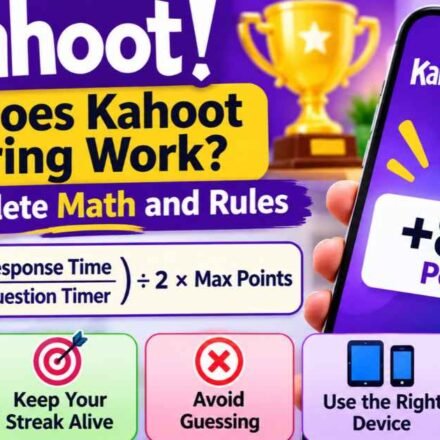
The Secret to Winning: The Mathematics of Kahoot Scoring
To dominate the leaderboard, you must understand exactly how Kahoot scoring rewards players. The system calculates your final total using two distinct metrics: base speed points and the consecutive answer streak. Understanding the math behind these numbers changes how you approach the game.
Calculating Base Speed Points
When a standard question appears, it carries a maximum value of 1,000 points. The platform uses a specific mathematical formula to calculate how many of those points you actually receive. Your score equals the maximum points multiplied by a time-decay fraction.
If you answer instantly, you receive nearly the full 1,000 points. If you take exactly half the allotted time to answer, you receive 750 points. If you answer in the final fraction of a second, your score drops toward a minimum of 500 points. Because the point drop is gradual, pausing for one extra second only costs you a few dozen points, making it mathematically worthwhile to double-check your answer.
The Answer Streak Bonus
When you answer your first question correctly, you earn points strictly based on the countdown timer. Once you get two correct answers in a row, the game awards you an additional 100 bonus points. This changes the dynamics of the game entirely.
This streak level increases with every subsequent correct answer. After reaching five consecutive correct answers, the streak bonus caps at 500 extra points per round. Maintaining this cap is the most effective way to separate yourself from the rest of the room. A slow player on a five-question streak earns more points per round than a lightning-fast player who just broke a streak.
Speed vs. Accuracy: The Danger of Guessing
Because the timer ticks down rapidly, players often panic and guess instantly. While speed earns you a higher percentage of the 1,000 base points, getting the question wrong costs you the entire streak bonus.
Consider a five-question scenario. If you guess blindly on question three and get it wrong, you lose the 300-point bonus for that round, the 400-point bonus for the next, and the 500-point bonus for the final round. That single rushed mistake costs you 1,200 potential points over the next few minutes. Winners pause for a split second to verify their choice.
Physical Setup: Preparing Your Hardware for Speed
Your hardware choices and physical posture directly impact your reaction time. You cannot win consistently if your device slows you down, no matter how well you know the material.
Touchscreen vs. Mouse and Keyboard
Always use a smartphone or tablet instead of a laptop with a trackpad or mouse. Tapping a glass screen registers faster than dragging a cursor across a monitor and clicking a button.
If you are forced to use a laptop in a computer lab setting, do not use a trackpad. Connect a wired USB mouse, which provides better precision and eliminates the input delay commonly associated with Bluetooth mice or laptop touchpads. Keep your cursor hovering near the center of the screen before the question loads.
The “Head Up” Strategy
Top players do not look down at their phones while playing. Keep your head up, facing the main smartboard or projector where the questions and answers appear. Glancing back and forth between the board and your phone wastes critical milliseconds on every single round.
To do this effectively, you must understand the interface layout. The red triangle is always top-left, the blue diamond is top-right, the yellow circle is bottom-left, and the green square is bottom-right. Learn this grid instinctively.
Thumb Placement and Muscle Memory
Hold your smartphone with both hands. Keep your thumbs hovering low and close to the exact center of the screen where the four colored answer boxes meet.
By hovering your thumbs directly in the middle of the grid, the distance to any of the four options is identical. This positioning builds muscle memory, allowing you to tap the correct shape instinctively without taking your eyes off the classroom board.
In-Game Mental Tactics to Beat Your Classmates
Beyond your physical setup, you need to process information faster than the people sitting next to you. Reading the question efficiently is often more important than reading the answers.
Skimming for Keywords
Kahoot is a fast-paced game, so do not read every question word-for-word like a textbook. Train your brain to spot specific keywords, names, dates, or core concepts, and ignore the extra text.
If a history question asks, “In what year did the United States formally declare its independence from Great Britain?”, your brain only needs to process “year” and “independence.” Once you identify the core subject, scan the four answer choices immediately. This speed-reading technique gives you a clear edge.
Beware the Randomized Answer Trap
Some players try to memorize the color order of answers if they have played the quiz before. This strategy often backfires and ruins long streaks, plunging players to the bottom of the leaderboard.
Teachers and hosts frequently learn how to randomize Kahoot questions and answer orders to prevent cheating. The red triangle from yesterday’s practice game might be the green square today. You must memorize the actual text of the correct answer rather than relying on previous visual patterns.
Predicting the Host
Teachers often leave clues about the correct answers in the way they write their quizzes. If you notice that one answer choice is significantly longer and more detailed than the other three, it is statistically more likely to be the correct answer.
Additionally, many educators pull questions directly from chapter summaries, bolded textbook vocabulary words, or pre-made flashcard sets. Recognizing these patterns helps you anticipate the answers before the options fully load on the screen.
Adapting to Advanced Game Modes and Question Types
Kahoot offers multiple question formats beyond the standard four-option multiple choice. Adjusting your strategy for these specific modes ensures you maintain your streak bonus during tricky rounds.
True or False Questions
True/False questions only feature two options: a blue diamond for True and a red triangle for False. Because you have a fifty percent chance of guessing correctly, the entire classroom will answer these questions extremely fast. Speed is paramount here. Keep your thumbs hovering directly over the top half of your screen to shave milliseconds off your reaction time.
Multi-Select Questions
Multi-select questions require players to choose more than one correct answer before tapping a submission button. You cannot rush these rounds. Read every single option carefully, as selecting one incorrect option invalidates the entire answer and breaks your streak. Methodical accuracy is more important than speed in this game mode.
Puzzle and Slider Modes
In Puzzle mode, you must drag and drop tiles into the correct chronological or logical order. Use both thumbs to quickly slide the tiles, focusing on identifying the very first and very last items in the sequence first. In Slider mode, where you drag a dot along a number line, aim for general proximity immediately rather than wasting time trying to land on the exact perfect decimal.
Dealing with Screen Lag and Connection Delays
A poor internet connection will ruin your timing, even if you know every answer perfectly. When playing in a crowded classroom, the local Wi-Fi network often struggles to process inputs from thirty different devices simultaneously.
Cellular Data Workarounds
If you notice a delay between the main screen and your phone, disconnect from the school Wi-Fi and use cellular data if your mobile plan allows it. 4G and 5G networks often have much lower latency than a congested router in a brick-walled classroom, meaning your taps register with the game server faster.
Device Optimization
Closing background applications on your phone frees up memory, ensuring the app or web browser runs as smoothly as possible. Turn off battery saver mode, which often throttles your phone’s processor and slows down screen rendering times. Finally, ensure your screen brightness is comfortable and disable “night mode” or blue light filters, which can cause slight visual delays.
How to Practice Before the Real Game
Familiarity reduces panic. If you know the subject of an upcoming test, search for public quizzes on that topic and play them at home. There is a high probability your teacher is using a quiz created by another educator on the same subject.
You can easily learn how to play Kahoot solo using the mobile application. Practicing alone helps you adjust to the countdown rhythm so the timer feels familiar instead of stressful.
You can also use the Ghost Mode feature to compete against your previous scores. Striving to beat your personal best trains your reaction speed without the pressure of a live classroom environment. When you simulate the pressure of the game at home, the actual classroom experience feels much slower and easier to manage.
Frequently Asked Questions
Does Kahoot reward speed or accuracy more? Accuracy matters significantly more than speed. While answering quickly earns you a larger share of the 1,000 base points, answering correctly builds a streak multiplier. Missing a question destroys your streak, which costs far more points over the long term than submitting a slow correct answer.
Can I use a bot to win Kahoot? Using automated scripts or bots violates the platform’s terms of service. Furthermore, teachers can easily see when unnatural names flood the screen and can block or remove offending players from the lobby. Relying on software exploits also prevents you from actually learning the educational material.
Can the host change the points awarded? Yes. While standard questions are worth 1,000 points, hosts can toggle specific questions to be worth double points (2,000) or zero points. Hosts can also disable the answer streak bonus entirely in the game settings, which means speed becomes the only distinguishing factor between players who know the answers.