






















Kahoot is popular in classrooms, study groups, and family game nights, but its pricing can be confusing. You can join a quiz for free, yet some features show an upgrade button when you try to create or host one.
So, is Kahoot free, or do you need a subscription to use it properly? The answer depends on what you want to do and which type of account you have. Here’s what you can use without paying, where the limits apply, and when a paid plan might be useful.
Quick Answer
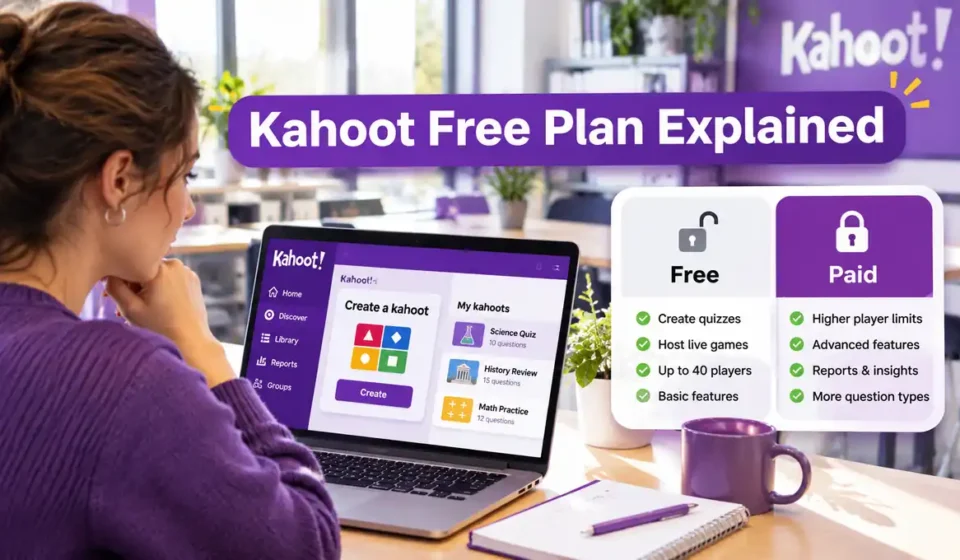
Yes. Kahoot still has a free plan in 2026. Players can join a live game without paying or creating an account, while free users can make basic quizzes and host sessions. The catch is that free hosting limits depend on the account: Kahoot! Go allows 10 players for study accounts and 40 for K–12 school teachers, according to Kahoot’s help center. More advanced question types, detailed reports, and larger events may require a paid subscription. The mobile app is free to download but offers in-app purchases.
Is Kahoot Still Free in 2026?
Yes, Kahoot offers a free account called Kahoot! Go. It includes basic tools for creating quizzes, hosting games, and studying. You don’t have to purchase a subscription simply to start using the platform.
Kahoot’s official free-use guide confirms that participants can join games without paying. Students can also create and host basic kahoots through a free account.
However, free access doesn’t mean every feature is included. Some question types, reporting tools, and larger participant limits are reserved for paid subscriptions.
Is a Kahoot Account Free?
Creating a basic Kahoot account is free. Visit Kahoot’s website, select the free sign-up option, and choose the account type that matches how you plan to use it.
Your account category matters because a teacher, student, personal user, and business user may have different features and hosting limits. Choose the appropriate category rather than selecting one only to obtain a higher player limit.
Is Kahoot Free to Join Without an Account?
Yes. If someone else is hosting a game, you can normally join without registering or buying a plan. Open kahoot.it, enter the game PIN supplied by the host, and choose a nickname.
This is different from running your own quiz. Participants can play Kahoot games for free, but hosts need an account and must follow the limits of their plan.
What Can You Do With Kahoot for Free?
The free plan covers several everyday activities. You can create a simple quiz, host it for a small group, or use public kahoots for practice and review.
The main restriction is not whether you can use Kahoot at all. It’s which tools you can use and how many people can participate in a session.
Create Basic Quizzes
Free accounts can create kahoots using standard question types, such as quiz and true-or-false questions. You can add questions, save your work, and use it for a live game or a study activity.
For example, a teacher could make a ten-question vocabulary quiz, while a student could build a short science review. Both activities can work without premium question types.
If you’re making your first quiz, follow our guide to create a Kahoot and stick to features available on your plan. Kahoot’s official creation guide explains how the editor works.
Host Live Games
A free user can host a live quiz and invite participants with a game PIN. The host controls the session, while players answer questions on their own devices.
This is useful for a short classroom review, a study group, or a family trivia game. If you need instructions for starting a session, see how to host a Kahoot.
Kahoot also confirms that free users can run multiple games in one day. The participant limit applies to a session; it doesn’t mean you’re allowed to host only one game.
Use Public Quizzes and Study Tools
You can explore publicly available kahoots instead of creating every quiz yourself. This can save time when you need a quick activity about multiplication, geography, or another familiar subject.
Students with free accounts can also use supported study activities, including flashcards. Some additional learning modes or content may have plan-specific restrictions, so check what is available in your account.
Assign a Quiz for Independent Practice
Kahoot supports assigning a quiz for participants to complete at their own pace. This can help when students are studying at different times or cannot attend the same live session.
Assignment participant limits still depend on the host’s plan. A free assignment isn’t automatically unlimited just because players complete it separately.
Is Kahoot Free for Teachers, Students, and Families?
Kahoot provides free access across several account categories, but the experience isn’t identical for everyone. Understanding these differences can prevent confusion when you see a player limit or upgrade message.
For Teachers
K–12 teachers can use a free account to create basic quizzes, host live classroom activities, and assign practice games. Kahoot’s current participant-limit guide lists up to 40 players for the free Kahoot! Go school account.
That can be enough for a typical class. A teacher who needs advanced reports, additional question formats, or larger sessions may find a paid plan more suitable.
College and university educators should check the higher-education category separately. Kahoot currently lists a smaller free Go limit for that account type.
For Students
Students can join teacher-hosted games for free. They do not need a paid subscription to answer questions, compete with classmates, or participate in an assigned activity.
Students can also register for free accounts to create quizzes and study independently. Kahoot applies additional privacy and feature restrictions to younger users, including children under 13 in the United States.
For Parents and Personal Users
Parents can use Kahoot’s free plan for short quizzes at home, such as a family trivia night or a spelling practice game. Friends can also play together without each person purchasing a subscription.
For personal Kahoot! Go accounts, the published free hosting limit is 10 participants. If you’re planning a larger gathering, check the account’s current allowance before inviting everyone.
What Are the Limits of Kahoot’s Free Plan?
The most important free-plan limit is the number of people who can join a hosted game. There isn’t one universal number for every Kahoot account.
According to Kahoot’s participant-limit guide, the following limits apply to current Kahoot! Go account categories.
| Free account category | Live-game limit | Assignment limit |
|---|---|---|
| Student or study | 10 | 10 |
| Personal or home | 10 | 10 |
| K–12 school teacher | 40 | 40 |
| Higher-education educator | 10 | 10 |
These figures refer to the listed free Go plans, not every older or promotional account. Business accounts have separate rules, and certain game formats or age-based restrictions may also apply.
Kahoot’s school pricing page currently contains inconsistent wording about the free limit: its comparison table and dedicated help guide list 40 for K–12 teachers, while a pricing FAQ mentions 10 for Go. For an important event, confirm the limit shown in your account before inviting participants.
Our separate guide to Kahoot player limits explains the topic in more detail.
Are Free Kahoot Quizzes Unlimited?
You can make and reuse basic quizzes without purchasing a paid plan, but that doesn’t mean every creation feature is unlimited. Premium question types, media tools, or other paid features may be unavailable.
A common problem occurs when someone adds a premium feature to an otherwise free quiz. The editor may then ask them to upgrade before saving or using that feature.
Can You See Results on the Free Plan?
Free hosting can show basic game results, such as scores and the leaderboard. More advanced reporting and ways to track learning over time may require a subscription.
If reports are essential for grading or monitoring student progress, compare the reporting features of your exact plan before paying.
Kahoot Free vs. Paid Plans: What’s the Difference?
The free version is suitable for basic quizzes and smaller groups. Paid plans generally expand what a host can create, how many people can join, and which teaching or presentation tools are available.
The best choice depends on how you’ll use Kahoot. Someone hosting a quick family game has different needs from a teacher assessing several classes or a business presenting to hundreds of people.
| Feature | Free Kahoot! Go | Paid plans |
|---|---|---|
| Join games as a participant | Yes | No paid plan needed to join |
| Create basic quizzes | Yes | Yes |
| Host live games | Yes, within account limits | Yes, with plan-specific limits |
| Use premium question types | Restricted | Available on eligible tiers |
| Access advanced reports | Restricted | Available on eligible tiers |
| Host larger groups | Limited | Higher limits on eligible tiers |
| Access all premium content | No | Depends on subscription |
How Many Players Do Paid School Plans Allow?
For individual K–12 school accounts, Kahoot currently publishes these participant limits:
| School plan | Live participants |
|---|---|
| Kahoot! Go — Free | 40 |
| Kahoot! Plus Bronze | 50 |
| Kahoot! Plus Silver | 100 |
| Kahoot! Plus Gold | 200 |
| Kahoot! One | 800 |
Higher-priced tiers and institution-level plans may support larger events. These numbers come from Kahoot’s school plans page and can change as subscriptions are updated.
How Much Does Kahoot Cost?
Kahoot doesn’t have one price that covers all users. School, student, personal, and business subscriptions have different products, features, and billing options.
Check the official school pricing page or the pricing section for your account category before choosing a plan. Pay close attention to whether the amount shown is a monthly payment or a monthly equivalent billed annually.
Kahoot’s school pricing cards and billing FAQ currently describe monthly payment availability differently. Because of that inconsistency, the final checkout terms are especially important. Confirm the total charge, renewal period, and included features before paying.
Does Kahoot Offer a Free Trial?
Kahoot sometimes offers free trials for selected paid subscriptions, but a trial is not guaranteed for every user or plan. According to its official trial policy, an eligible offer displays a Start free trial button.
The regular trial period is seven days unless the offer states otherwise. If that button isn’t available, the plan may not offer a trial, or your account may not qualify.
Most importantly, the free plan and free trial are not the same thing. A free account can remain free, while a trial is temporary access to a paid subscription.
Will Kahoot Charge You After a Trial?
Kahoot says an eligible trial can automatically convert to a paid subscription after the trial ends. If you don’t want to continue, review the renewal terms and cancel before the charge is due.
Web subscriptions and subscriptions purchased through a mobile app may have different cancellation methods. Our guide explains how to cancel a Kahoot subscription and where to check the billing details.
If you only need basic quizzes, starting with a free account is usually the simplest way to avoid an unwanted subscription.
Why Does Kahoot Ask You to Pay or Upgrade?
An upgrade message doesn’t necessarily mean Kahoot has stopped offering free accounts. It often appears because the action you’re attempting requires a feature that isn’t included in your plan.
For example, you might create several standard questions and then select a premium question type. The editor can ask you to upgrade even though the rest of your quiz uses free tools.
If Kahoot asks for payment unexpectedly, try these steps:
- Check your account type. Make sure you registered under the category that describes your actual use.
- Review the quiz editor. Look for question types or features marked as premium and replace them with free alternatives.
- Check your participant limit. A larger group may require a different hosting plan.
- Review the content you’re using. Some ready-made activities or additional resources may require premium access.
- Check your subscription status. If you previously started a trial, review its renewal or expiration terms.
A Reddit discussion about free player limits illustrates why users sometimes receive different answers about group sizes. The reliable explanation is to check the host’s account category and current plan rather than assume everyone has the same limit.
If the upgrade request still seems wrong, contact Kahoot support with the account type and feature you’re trying to use. You can also browse our Kahoot learning guides for help with common setup and gameplay questions.
The bottom line: Kahoot is still free for joining games, making basic quizzes, and hosting smaller sessions. A paid plan becomes worth considering when you need a specific premium feature or a higher participant limit—not simply because you want to use Kahoot at all.




[…] and Stop Auto-Renewal How to Share a Kahoot With Students, Friends or Teachers Is Kahoot Free? Free Features, Limits and Paid Plans Explained How to Make a Kahoot Public […]
[…] and Stop Auto-Renewal How to Share a Kahoot With Students, Friends or Teachers Is Kahoot Free? Free Features, Limits and Paid Plans Explained How to Make a Kahoot Public […]